
Everyone’s holiday, on one wallchart, counted to the hour.
Your team books time off from the app or a browser. Their manager approves it from the email. Holiday follows the hours each person works, so the part-timer on three days gets exactly what they’re owed. No arguing over half days.
Free for every company, any size, until our formal release. No card needed.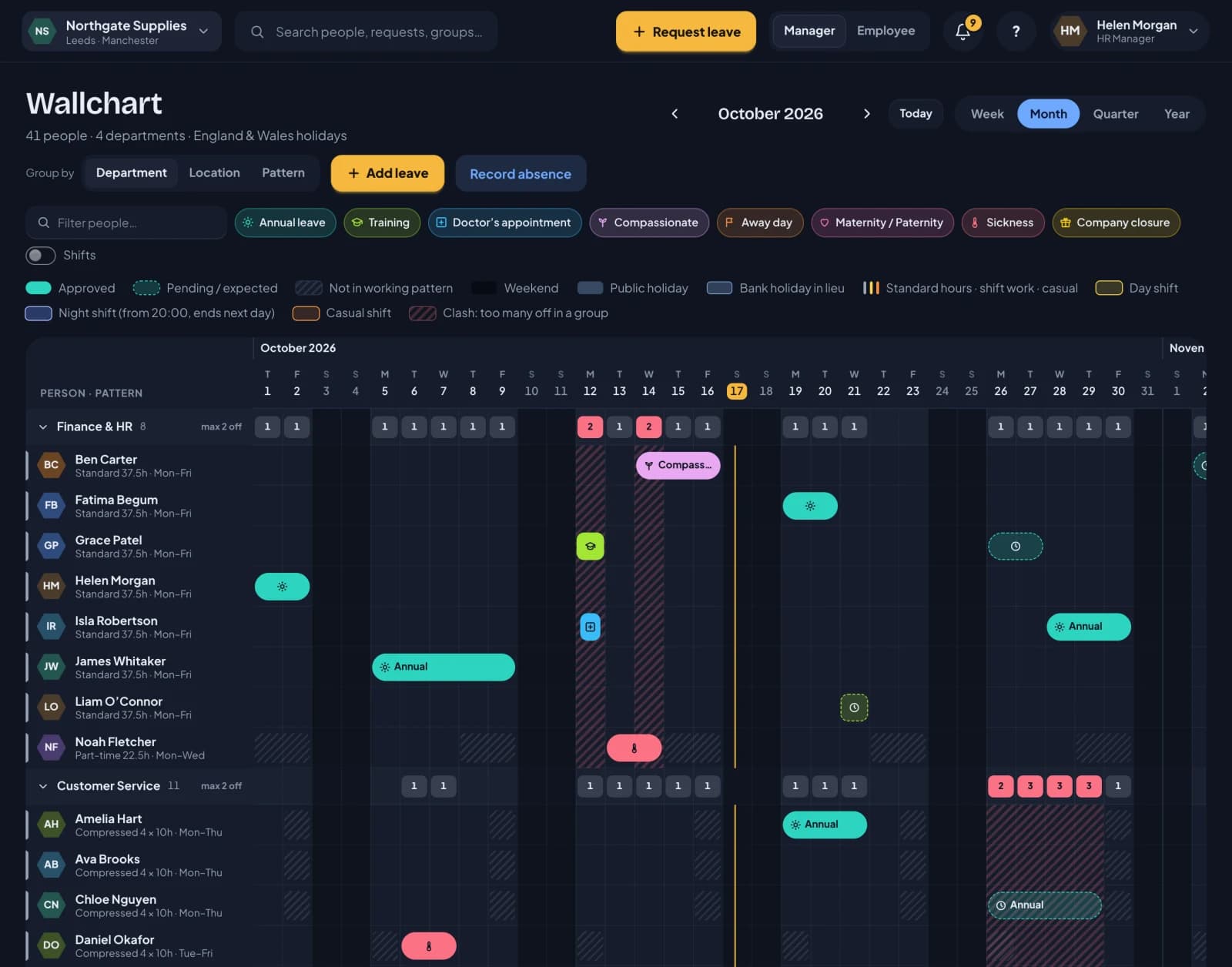
Leave, sickness and cover for teams on standard hours.
Set each person’s week once, such as 37.5 hours Monday to Friday, three days a week or four 10-hour days. There’s no rota to plan. RotaTiger works out the rest from that pattern.
One wallchart
Who’s off this week, this month or all year, grouped by department or location.
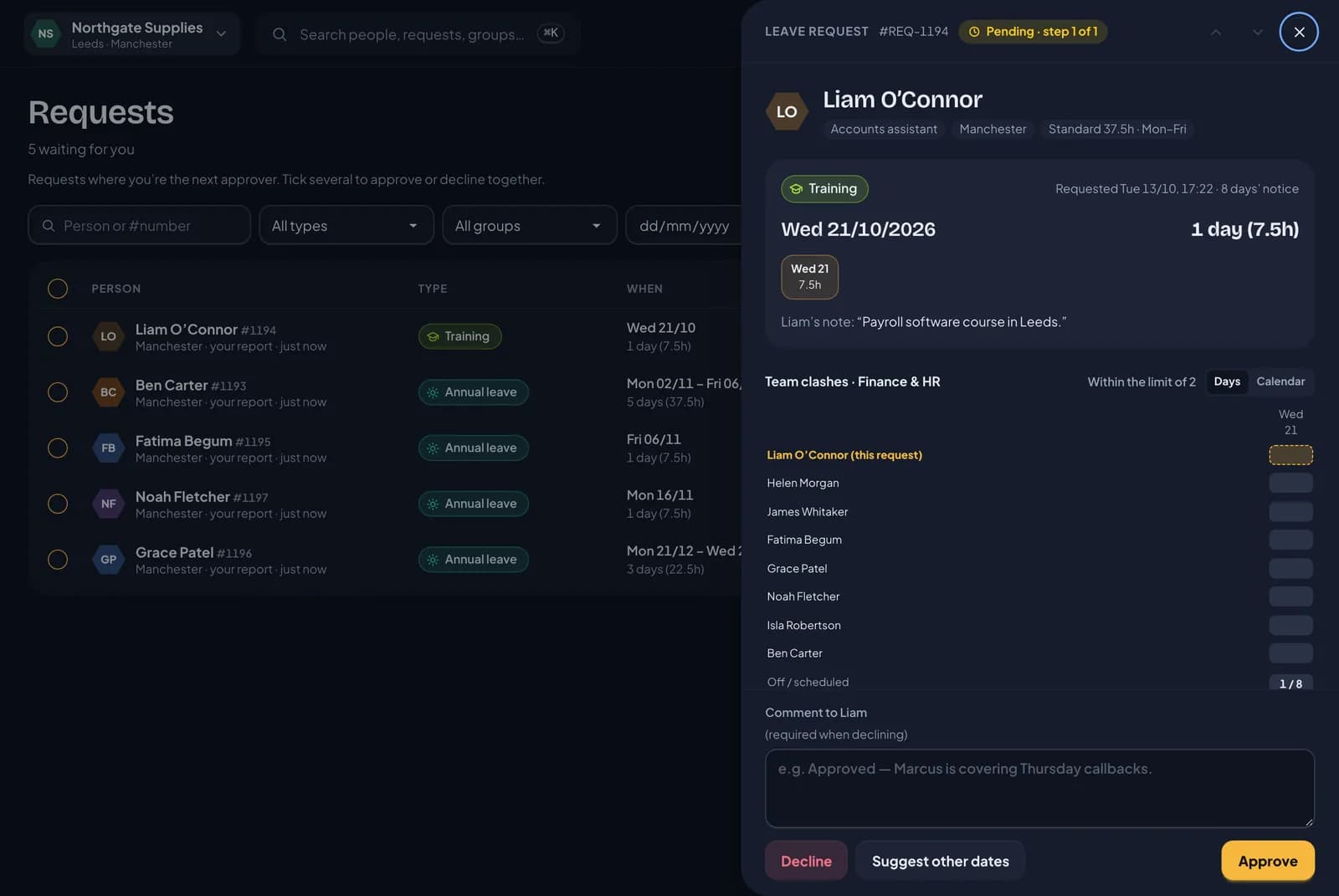
Approve from the email
One click to say yes or no, with the balance and cover shown first.
Hours or days
Stored in hours and shown as “14 days (105h)”, so part-time and compressed weeks add up.
Bank holidays per location
England and Wales, Scotland, Northern Ireland and the US, two years ahead.
Sickness, kept private
Colleagues see “Away”. Managers get fit note reminders and the Bradford factor.
Records and payroll export
Six years of holiday records, and a payroll export in hours for UK companies.
Set each person’s week once, and the holiday maths is done for you. Free during the beta.
Part-timers get what they’re owed. To the hour.
Counting in days goes wrong when someone works three days, or four long ones. RotaTiger keeps every balance in hours and costs each booking from that person’s own week. Days still appear: a full-timer sees “25 days (187.5h)”.
- A day off is that person’s day: 7.5 hours for one, 10 for another.
- The statutory 5.6 weeks is worked out from each person’s hours, then rounded up. Never down.
- Starters and leavers get a pro-rata allowance, worked out for you.
- Part days are booked in hours, such as a two-hour dentist appointment.
- Change someone’s hours mid-year and their future bookings are re-costed. They’re told if anything moved.
- Amelia37.5h, Monday to Friday37.5h
- BenPart-time, 22.5h over Monday to Wednesday22.5h
- JakeFour 10-hour days40h
Each of them is charged one week. Ben isn’t charged for Thursday or Friday. He doesn’t work them.
No more arguing over half days. Try it with your own team, free during the beta.
Say yes from the app, or straight from the email.
The line manager gets the request with what they need to decide: the hours, the balance left after, who else is off and whether cover holds. One click approves or declines. Links work once, expire after seven days and still run every check.
- Line managers can approve from the RotaTiger app too. It’s coming soon for iPhone and Android, and the website works on any phone until then.
- A delegate covers approvals while a manager is away.
- HR only steps in when one of your rules asks for it.
- Suggest other dates or approve several at once. You have ten minutes to undo a decision.
- Approved leave arrives with a calendar file for Outlook or Google.
UK and US bank holidays, set for each location.
All three UK calendars and the US federal list are built in, two years ahead. Each office picks its own, so the Glasgow team gets St Andrew’s Day and the Leeds team doesn’t.
- Separate calendars for England and Wales, for Scotland and for Northern Ireland, plus the US federal list.
- Each location has its own calendar and time zone, and can stay open on bank holidays if you trade.
- Taken at that day’s hours. Someone who doesn’t work Mondays doesn’t lose hours to a Monday bank holiday.
- Compressed hours: when a holiday lands on a day off, choose nothing extra, the next working day off, or a lieu day.
- Company days: a Christmas closure that costs nobody anything, or a shutdown that comes out of annual leave.
Record sickness fairly. Follow it up at the right time.
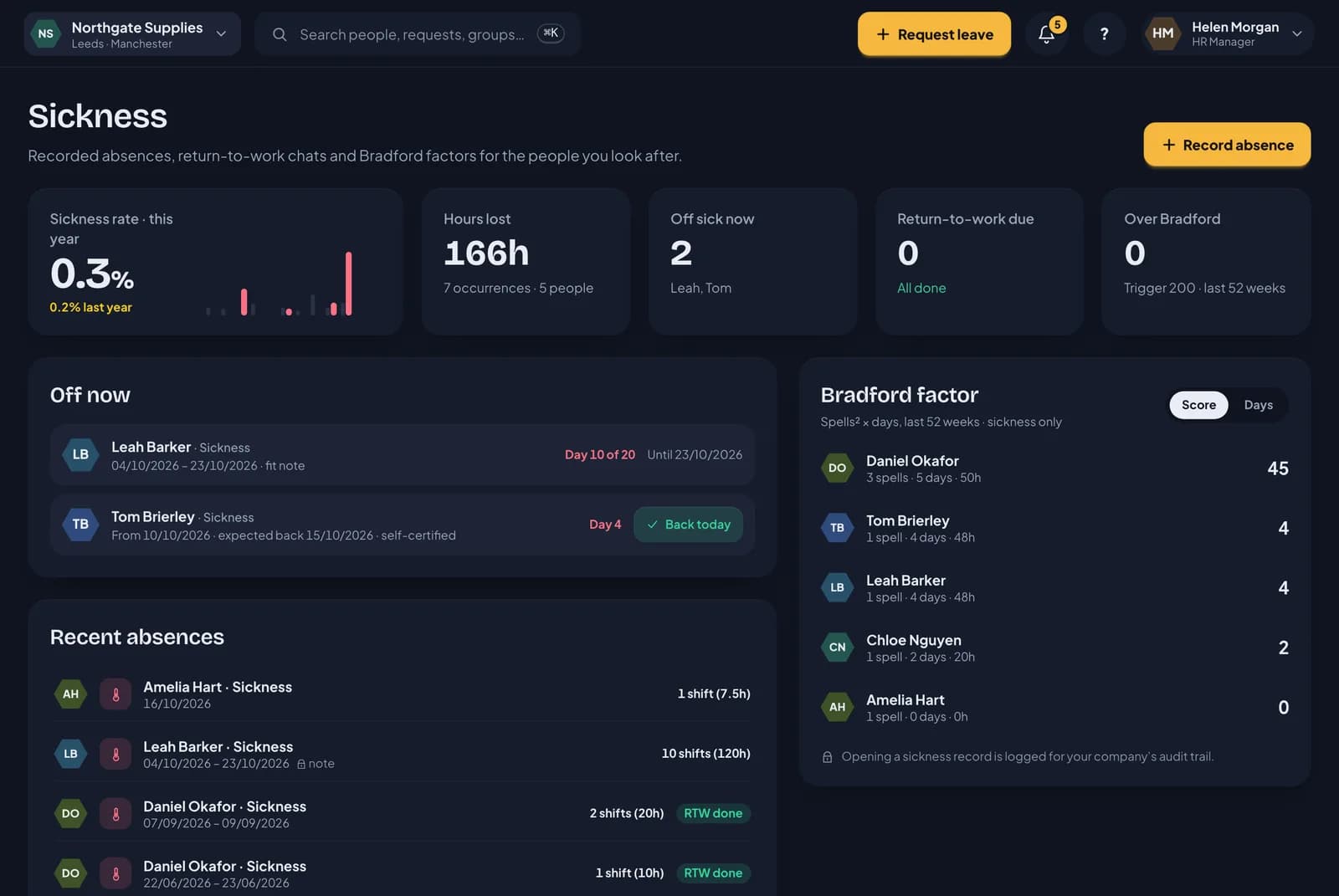
Staff report their own sickness, or a manager records it for them. RotaTiger keeps it private and reminds you of the next step.
- Colleagues see “Away”. The server removes the reason before it reaches anyone who shouldn’t see it.
- Open-ended absences are counted day by day, then close with a return-to-work reminder.
- A fit note reminder on day eight. Fit notes upload privately.
- The Bradford factor over a rolling 52 weeks, with a trigger you set.
- For UK companies, the sickness screen shows how many weeks of Statutory Sick Pay each person has used.
Know about the gap before you say yes.
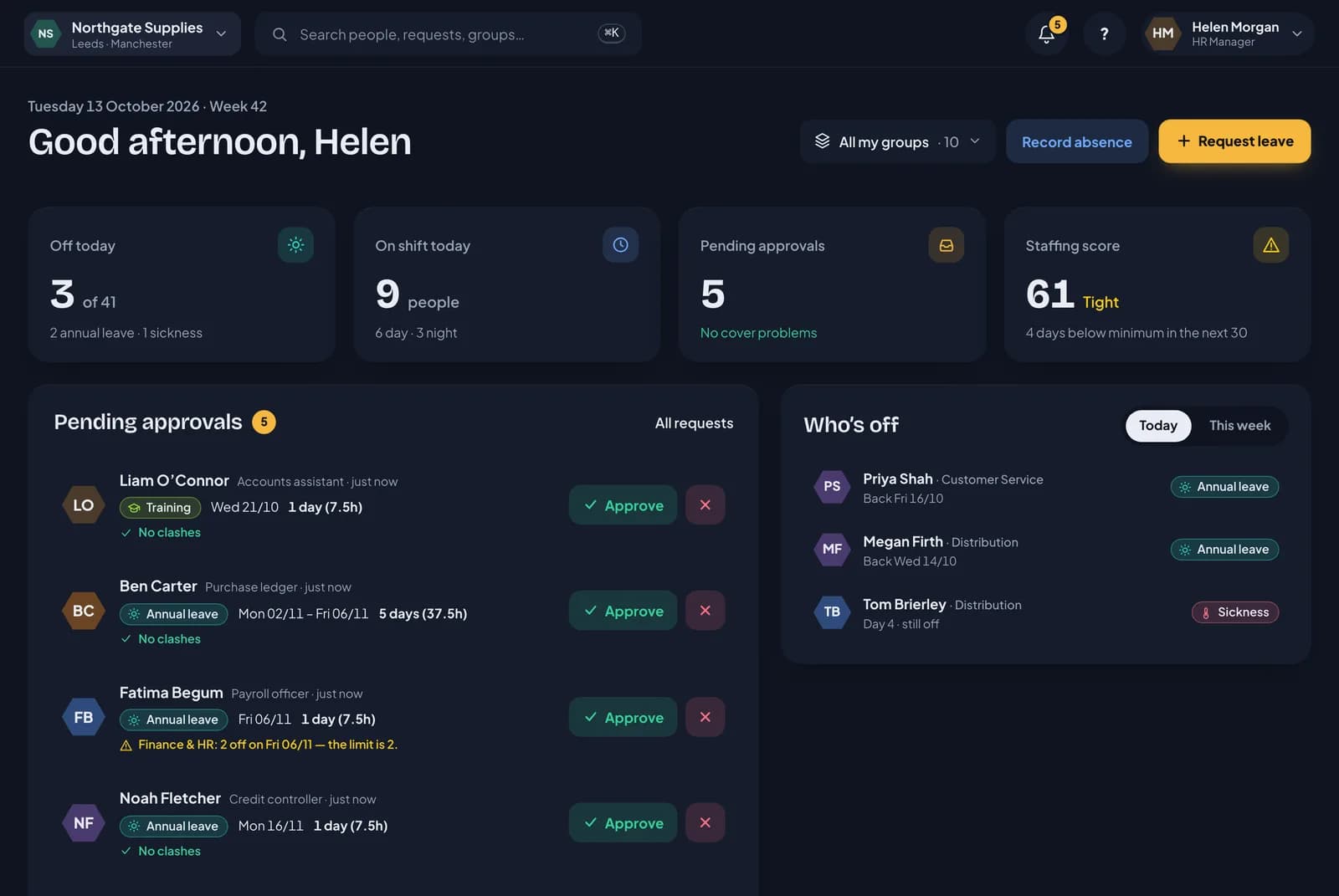
Each team sets its minimum cover and how many people can be off at once. RotaTiger checks both before anyone approves, and flags it everywhere a manager looks.
- Minimum cover for each weekday, and a limit on how many can be off together.
- Shortfalls show on the request, the dashboard and the wallchart, and managers get an email.
- A staffing score for each team over the next 30 days: good, tight or at risk.
- Team owners can change their own team’s cover without being HR.
Find the gap before you say yes. Free for every company during the beta.
Holiday records in hours. Never pay.
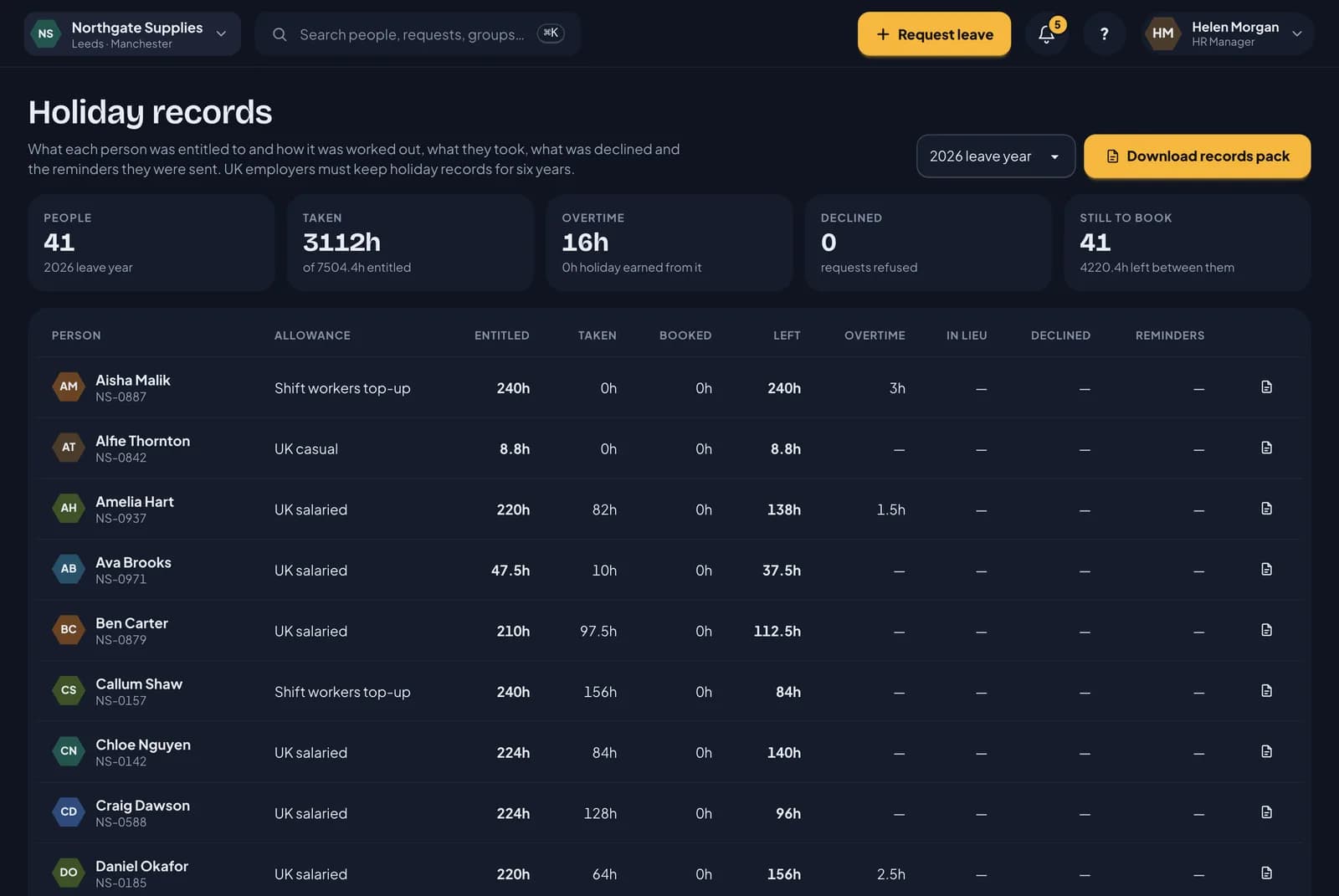
UK employers have to keep holiday records for six years. RotaTiger keeps them as you go, and gives your payroll provider the hours. It holds no pay rates, because it isn’t a payroll system.
- A holiday records page for each leave year: what everyone was entitled to, took and booked.
- A records pack to download: how each allowance was worked out, every booking and who approved it, and every declined request with its reason.
- A payroll export in hours, with leave by day and type, overtime and each person’s 52-week averages.
- Any company can download its people, leave and sickness records as CSV whenever it likes.
And if you ever add shifts, the rota’s already here.
A Saturday team, an evening help desk, a warehouse on earlies and lates. Put those people on the rota and plan their week on the same system. Their leave, sickness and bank holidays are already on it.
See how the rota works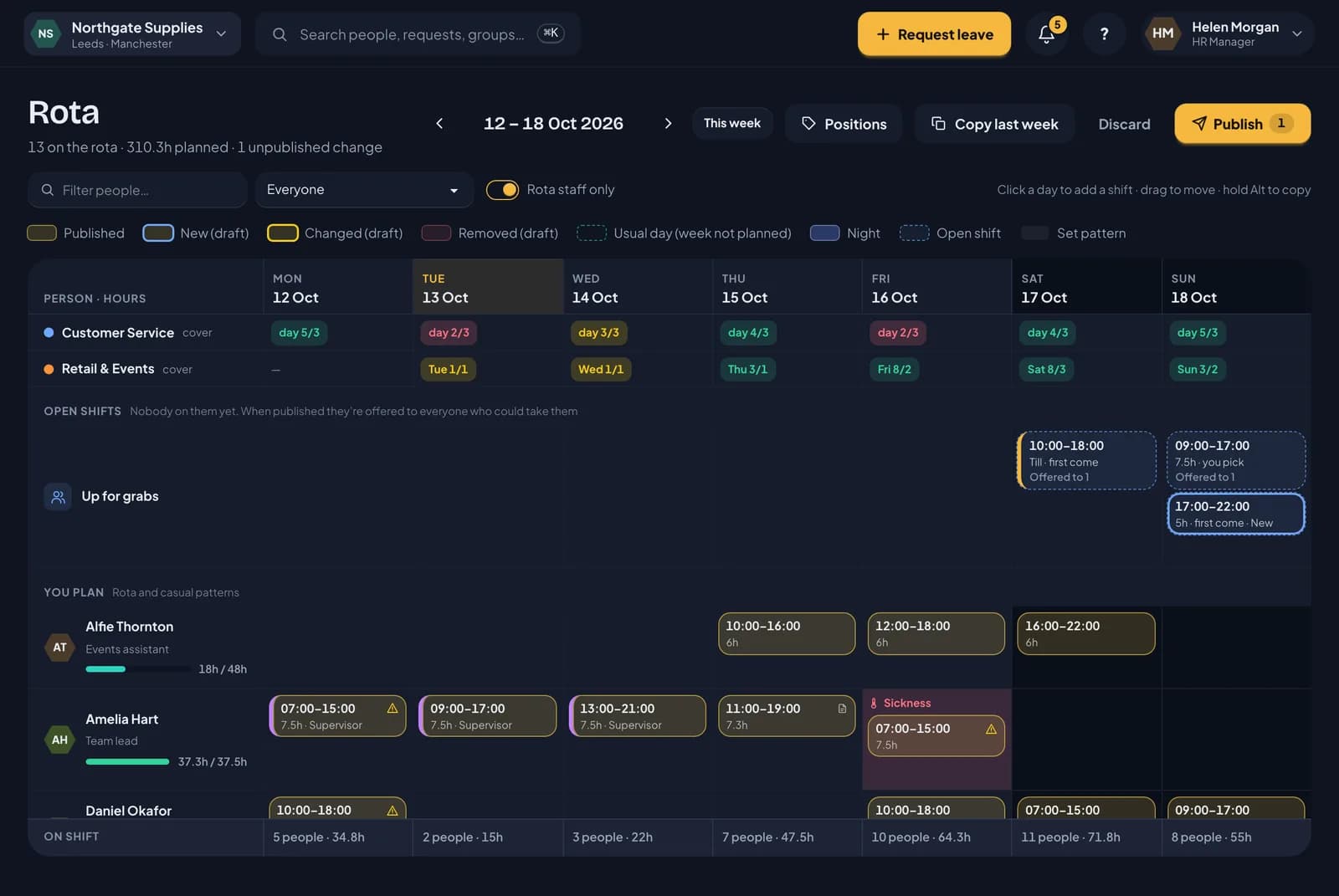
Moving from Timetastic? Bring your data with you.
Timetastic is a popular leave planner. If you want holiday counted from each person’s own hours, the Bradford factor, or a rota in the same product, here’s how the two line up. Every Timetastic entry below comes from their own website.
| Feature | RotaTiger | Timetastic |
|---|---|---|
| Leave wallchart | Yes | Yes |
| Approve in one click from the email | Yes | Yes |
| Approve from a mobile app | Coming soonAny phone’s browser until then | Yes |
| Allowances in hours as well as days | YesFor everyone, shown both ways | YesChosen person by person |
| Pro rata for part-timersWorked out from the days and hours each person works | Yes | Partly, or at extra costStarters and leavers. Timetastic’s help centre says it doesn’t cover part-timers |
| Public holidays | YesUK and US, per location | Yes250 countries, per person |
| Sickness recording | Yes | Yes |
| Bradford factor | Yes | No |
| Limit on how many can be off at once | Yes | Yes |
| Leave reports to download | YesCSV | YesExcel |
| Payroll export | YesIn hours, for UK companies | Partly, or at extra costRota & Time Clock plan |
| Rota and shifts | YesSame product, same login | Partly, or at extra costSeparate Rota & Time Clock app |
| Overtime recording | Yes | Partly, or at extra costRota & Time Clock plan |
| Price | Free during the beta | £1.20 (Business) or £2.00 (Pro) per user a month. Rota & Time Clock £4.00 |
YesNoPartial Partly, or as an add-on or higher planSoon Coming soon Not stated on their site
This table covers Timetastic only.
The full comparison adds Rotageek, RotaCloud and Deputy. It covers rotas and casual staff as well as leave.
Where RotaTiger is different
- Holiday is worked out from each person’s own week, for everyone. Three days a week, four long days or 37.5 hours all come out right. Starters and leavers too.
- The rota is part of the same product. Timetastic sells rotas and shifts as a separate app, Rota & Time Clock, at £4.00 a month for each user.
- UK companies get a six-year holiday records pack and a payroll export in hours. At Timetastic, the payroll export is part of Rota & Time Clock.
- The Bradford factor is built in. Timetastic’s help centre says it has chosen to leave it out.
- RotaTiger is free for every company during the beta.
- There’s an import for your Timetastic data, so you don’t start again.
Moving from Timetastic, step by step
Download your data from Timetastic
In Timetastic, go to Users, click the three dots next to a person and choose Download data. You get a zip with a Timetastic_Data.xlsx file inside. The import reads this per-person file. Timetastic’s Full backup won’t work.
Upload it to RotaTiger
Register, then upload the zip in the setup wizard or on People. Before anything is saved, you see what will come across and answer a few questions where the two systems differ, such as your leave year. Repeat for each person.
Check the balances
Afterwards, each person’s balance for each leave year sits next to the figure from Timetastic, so you can see they match. Uploading the same file twice creates no duplicates.
What comes across
- Each person’s name and email, job title, phone number, payroll number and start and leaving dates.
- Departments, and each person’s approver as their line manager.
- Work schedules, as the days each person works.
- Allowances for each leave year, brought-forward days and time in lieu.
- Every approved and pending booking, with your leave types matched or added. Cancelled and declined bookings too, if you want the history.
What stays behind
- Birthdays, home addresses and emergency contacts. RotaTiger doesn’t store them.
- Sign-in history and notification settings.
- Bookings that overlap leave already entered in RotaTiger. The RotaTiger leave wins.
Free while we’re in beta.
Every feature, for your whole team, at no cost until formal release. After that you’ll pay only for active people, and we’ll tell you the prices before anything changes.
Questions
No. Put each person on a fixed pattern, such as 37.5 hours Monday to Friday or three days a week, and their week is set. Leave, sickness, bank holidays and approvals all follow from it. Use the rota if you ever need it. Ignore it until then.
Yes. Balances are stored in hours and shown in days and hours, such as “25 days (187.5h)”, or in hours only if you prefer. A day off costs that person’s own day, so part-timers and compressed hours come out right.
Bank holidays are taken at that day’s hours. Someone who doesn’t work Mondays doesn’t lose hours to a Monday bank holiday. For compressed hours, you choose what happens when a holiday lands on a day off: nothing extra, the next working day off, or a lieu day.
Yes. Every request email has one-click Approve and Decline links. They work once, expire after seven days and still run every check. RotaTiger also works in any phone’s browser.
No. Staff book time off and check their balance in any phone’s browser, signed in with the link from their invite email. The iPhone and Android apps are coming soon.
No. Register and the setup wizard opens. It has six steps and saves as you go. Every step after the first can be skipped and finished later. Add your locations and choose a standard week. Then import your people from CSV or Excel, or from Timetastic.
In Timetastic, use Download data on each person and upload the zip to RotaTiger. Their details, department, line manager, working days, allowance for each leave year, brought-forward days, time in lieu and bookings come across. You see a preview before anything is saved. Afterwards, each leave year’s balance sits next to the figure from Timetastic. Birthdays, home addresses and emergency contacts stay behind.
No. RotaTiger holds hours, not pay rates, because it isn’t a payroll system. UK companies get a payroll export in hours, with each person’s 52-week averages. Your payroll provider works out the pay.
Sickness is private. Colleagues see “Away”, and the server removes the reason before it reaches anyone who shouldn’t see it. Every view of a private sickness note goes in the audit log. Admins can make two-step verification optional, or require it for HR and admins or for everyone.
Nothing, and you don’t need a card to sign up. Every company gets every feature for free until formal release. After that you’ll pay only for active people, and we’ll tell you the prices before anything changes.
Any time. Export people, leave, sickness, balances and adjustments as CSV in a single zip.
Get your team’s holiday off the spreadsheet.
Free for every company during the beta. No card needed, and the setup wizard opens as soon as you register.