
The rota that already knows who’s off.
Plan your team’s shifts on the same system that holds their leave, sickness and availability. Set how many people you need and when, let Auto-fill draft the week, check it, then publish. Your staff get their shifts straight away.
Rota and auto scheduling are included free for every company during the beta.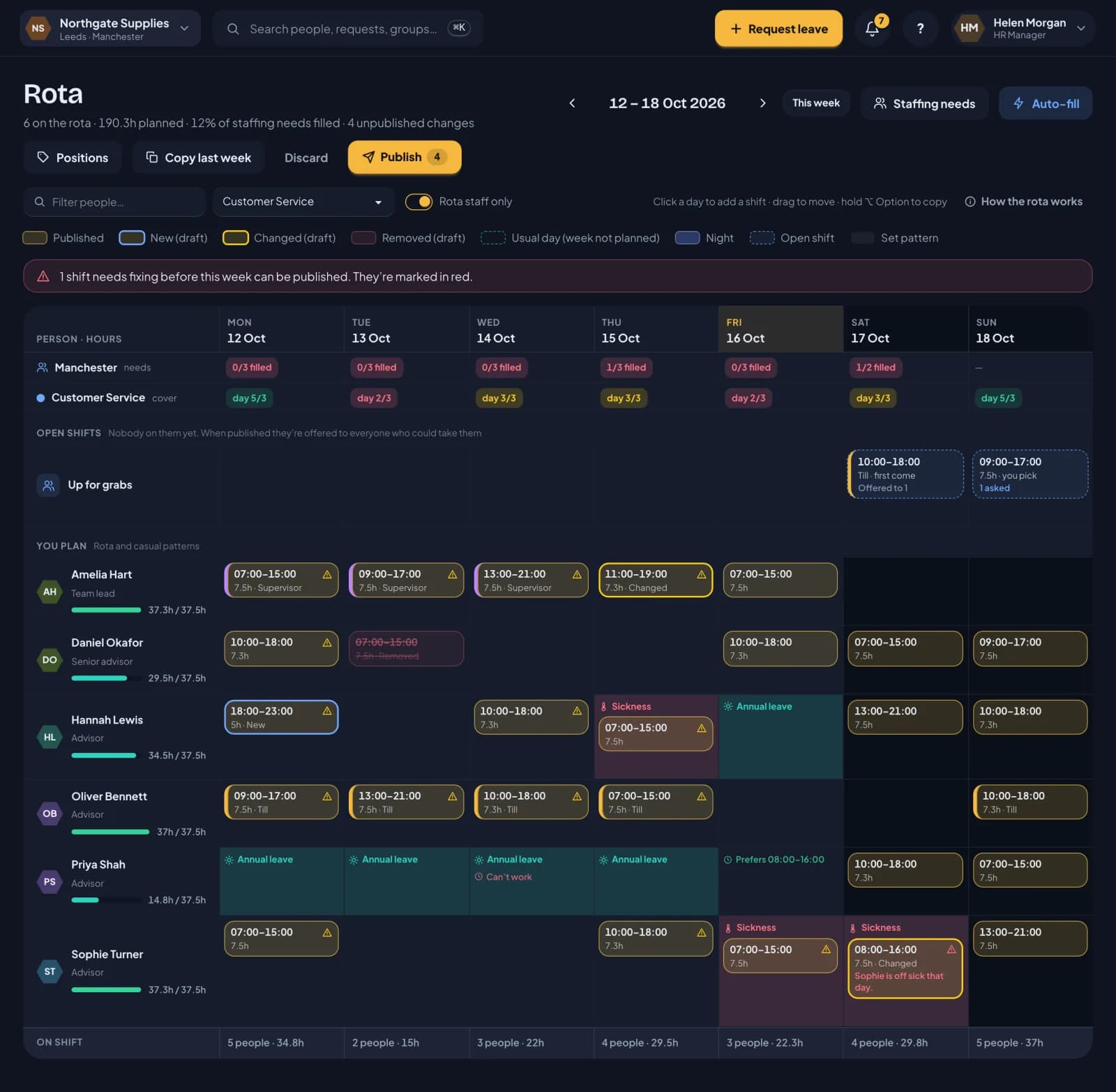
Plan, check, publish, fill.
A week on the rota goes the same way every time. You can do all of it by hand, or let RotaTiger do the first draft.
- 1
Plan
Click a day to add a shift, copy last week, or let Auto-fill draft the week from your staffing needs.
- 2
Check
Each shift is checked as it lands: rest, weekly caps, leave, sickness and availability. Red means fix it first.
- 3
Publish
Send the week for staff to check first if you like. Nothing changes until you publish, and then everyone whose shifts changed is told.
- 4
Fill
Shifts nobody’s on yet go out as open shifts to everyone who could work them.
Everything a shift team needs, and nothing it doesn’t.
A grid that shows the whole week
People down the side, days across the top, with leave, sickness and availability in each cell. Drag to move a shift, hold Alt (Option on a Mac) to copy it.
Checked as you plan
Overlaps, the longest shift, weekly caps, rest between shifts, the 17-week average, leave and sickness. Problems show on the shift itself.
Auto scheduling
Auto-fill puts people on each gap in your staffing needs. It meets contracted hours first, respects availability, and shares out weekends and nights fairly.
Staffing needs and positions
Say how many people you need, when, and doing what, for each location. The rota shows how full each day is.
Open shifts
Post a shift with nobody on it. Either the first to take it gets it, or people ask and you choose.
Staff availability
Staff say when they can’t work and when they’d prefer to. The rota warns you, and Auto-fill never books them then.
Send for review
Show staff the proposed week before it’s final. They say which shifts they can’t do and why, and you see every reply on the rota.
By shift, and fairness
See who’s on each shift and what’s still needed, drag people on, and check nobody always gets the lates or the weekends.
Templates
Staffing needs for bank holiday and Christmas weeks, and saved weeks of shifts you can lay onto any other week.
How it all works, step by step.
Twelve short pages, in the order you’ll meet them, with screenshots from our demo company, Northgate Supplies.
- Part 1 · 5 minPlanning the weekThe rota is a grid of people and days. Click to add a shift, drag to move it, hold Alt to copy it, or start from last week.
- Part 2 · 3 minBy shift, and fairnessTurn the rota on its side: shifts down the side, who’s on each one, and the places still needed. Drag people on from the staff list, and check nobody always gets the late shifts.
- Part 3 · 3 minThe checks on every shiftEvery shift is checked the moment you place it. A rule break is saved in red and stops the week being published. Amber is something you should know about.
- Part 4 · 3 minSend for reviewShow staff the proposed week before it’s final. They say if they can’t do a shift, and you see every reply on the rota before you publish.
- Part 5 · 3 minDrafts and publishingPlan as much as you like. Nothing changes for your staff until you publish. The preview shows every change first, and asks whether any extra hours are overtime.
- Part 6 · 2 minOpen shiftsA shift with nobody on it yet. When you publish, it’s offered to everyone who could work it.
- Part 7 · 3 minStaffing needs and positionsSay how many people you need, when, and doing what. The rota shows each day’s cover against it, and Auto-fill plans to it.
- Part 8 · 3 minTemplatesStaffing needs templates for the weeks that are different, like Christmas or a bank holiday week, and rota templates to save a good week and reuse it.
- Part 9 · 2 minStaff availabilityStaff say when they can’t work and when they’d prefer to. You see it on the rota, and Auto-fill plans around it.
- Part 10 · 3 minAuto schedulingAuto-fill drafts the week from your staffing needs. It only uses people who pass every check, shares out the less popular shifts, and can be undone in one go.
- Part 11 · 3 minWhat your staff seeWhen you publish, your staff get their week. They see their next shifts as soon as they open RotaTiger, and can take open shifts there too.
- Part 12 · 3 minLeave, holiday and hoursThe rota and your leave records are the same system, so holiday, sickness and hours all follow the shifts you publish.
Rota questions
HR plans everyone. Line managers and their delegates plan their own team, but not their own shifts. Everyone else on the grid is shown for cover, read only.
No. Auto-fill only adds draft shifts. You check them, move anything you like, then publish. If you don’t like the result, Undo removes everything that run added.
Yes, if you send it for review. Everyone on the week sees their proposed shifts and can say they can’t do one, with a reason, or that the week looks good. You see the replies on the rota, change what you need to, then publish. Until you publish, nothing changes for their hours or holiday.
The shift is marked in red, so you can’t miss it. When you publish, RotaTiger asks whether the extra is overtime, paid or as time off in lieu if their policy allows. If it is, it’s recorded as approved overtime for payroll. Over a weekly cap, it can only be published as overtime.
Yes. Everyone on a rota needs a login, so they can see their shifts, set their availability and take open shifts. People who haven’t signed in yet show on the grid with an invite link.
Yes. Until a week is published, each person’s usual days count, so they can book leave weeks ahead. Approved leave then shows on the rota and stops anyone being given a shift that day.
No. RotaTiger works in hours, not pay rates, because it isn’t a payroll system. You’ll see each person’s planned hours against their contract and each day’s total hours.
Yes. A shift that runs past midnight, or starts at 20:00 or later, is a night shift. It belongs to the day it starts and shows in its own colour.
Nothing during the beta. Every feature, rota and auto scheduling included, is free for every company until our formal release.
Plan next week in RotaTiger.
Rota, auto scheduling, leave and sickness in one place, free during the beta.
Join the free beta