
Everything you do on the rota is a draft at first. You can add shifts, move them and remove them as often as you like, and your staff won’t see any of it until you publish.
Telling drafts apart
The legend above the grid explains each style:
- Published shifts have a thin outline.
- New shifts, not yet published, have a blue outline.
- Changed shifts have an amber outline.
- Removed shifts stay on the grid, crossed through in red, until you publish.
- Usual days are dashed. They’re each person’s normal days in a week that hasn’t been planned yet. See leave and hours.
The subtitle under Rota counts the unpublished changes, and so does the badge on the Publish button.
The publish preview
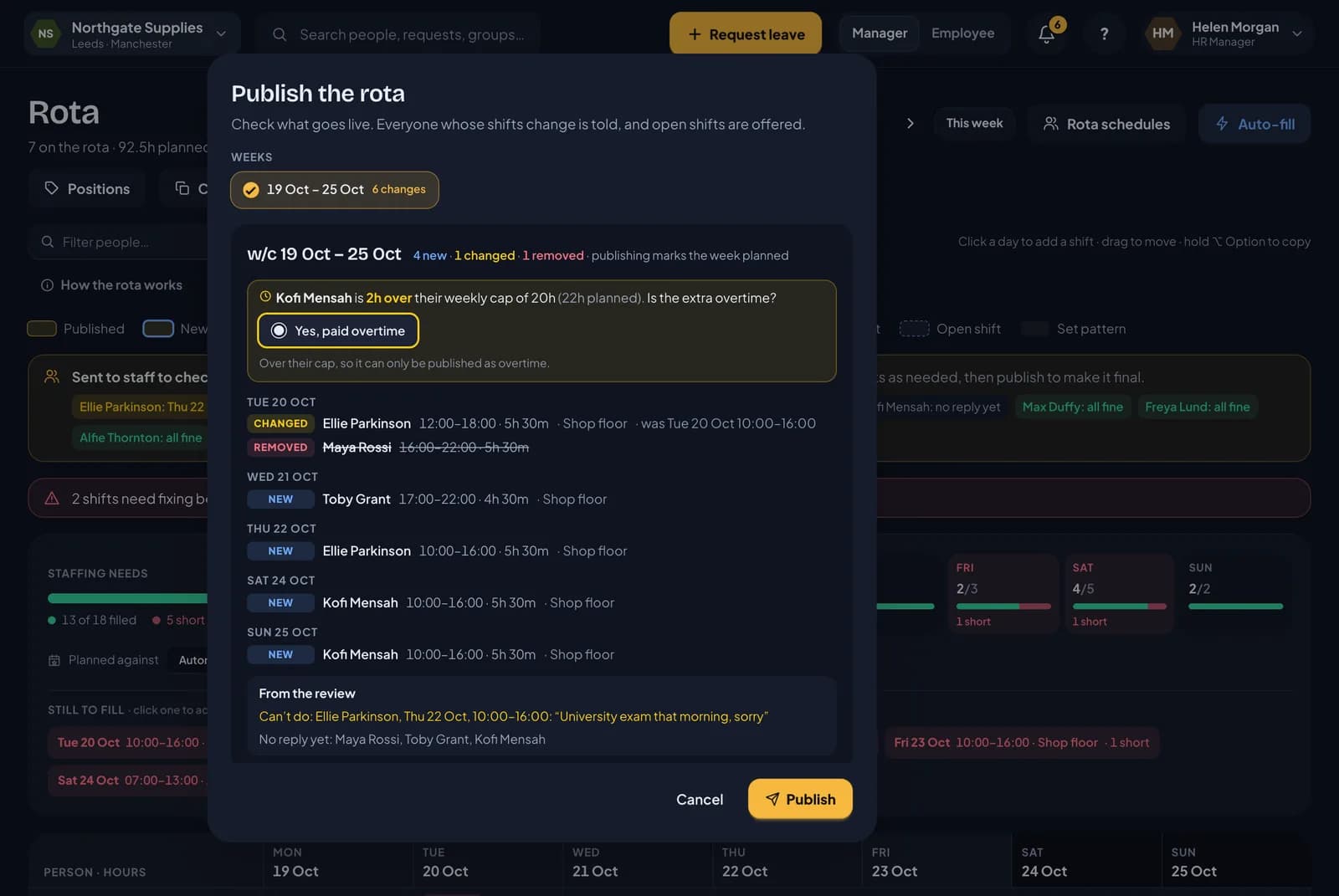
Click Publish. Before anything goes live, RotaTiger shows you exactly what will change, as in the screenshot at the top of this page.
- Weeks. Every week with unpublished changes is listed at the top. Tick one or more to publish them together.
- Every change, day by day. Each shift is marked New, Changed or Removed, with the person, times, paid hours and position. A changed shift says what it was.
- Things to fix. Any shift still in red is listed, and that week can’t be published until it’s sorted.
- From the review. If you sent the week for review, anything people said they can’t do, and anyone who hasn’t replied.
- People with no shifts. Anyone on a rota with no shifts that week, because publishing gives them the week off.
Is the extra overtime?
If publishing would take someone over their hours, the preview asks about it. That’s anyone on a rota pattern planned over their contracted hours, and anyone casual planned over their weekly cap.
For each person it shows how far over they are, and asks Is the extra overtime? The answers depend on their overtime and time off in lieu policy:
- Yes, paid overtime
- Yes, as time off in lieu
- No, normal hours, if they’re over their contract but not over a cap
Going over a weekly cap can only be published as overtime. If someone’s policy doesn’t record overtime at all, they can’t go over their cap, and you’ll need to change their shifts.
When you say yes, the extra hours are recorded as approved overtime, paid or banked as time off in lieu, so they reach the payroll export without anyone having to claim them. They’re the last hours of that person’s week. Because those hours are already in their shifts, they aren’t counted twice in holiday accrual.
Publishing
When you confirm, each person whose week changed gets an email and an in-app notification listing their shifts. Open shifts are offered at the same time, and any review of that week is closed. The message afterwards tells you how many changes went out and how many people were told.
From then on, hours, cover and holiday accrual use the published shifts.
Publishing covers only the people you plan. If you’re a line manager, you publish your own team’s week and nobody else’s.
Changing a published week
Edit the shift and publish again. Only the people whose shifts changed are told.
Discarding
Discard appears when there are unpublished changes. It puts the week back to what was last published, for the people you plan. It can’t be undone.
Weeks with no rota yet
Until a week is published for someone, RotaTiger counts their usual days, so they can book leave ahead. Once the week is published, the shifts are what count. Leave and hours explains why that matters.
Next: open shifts.