
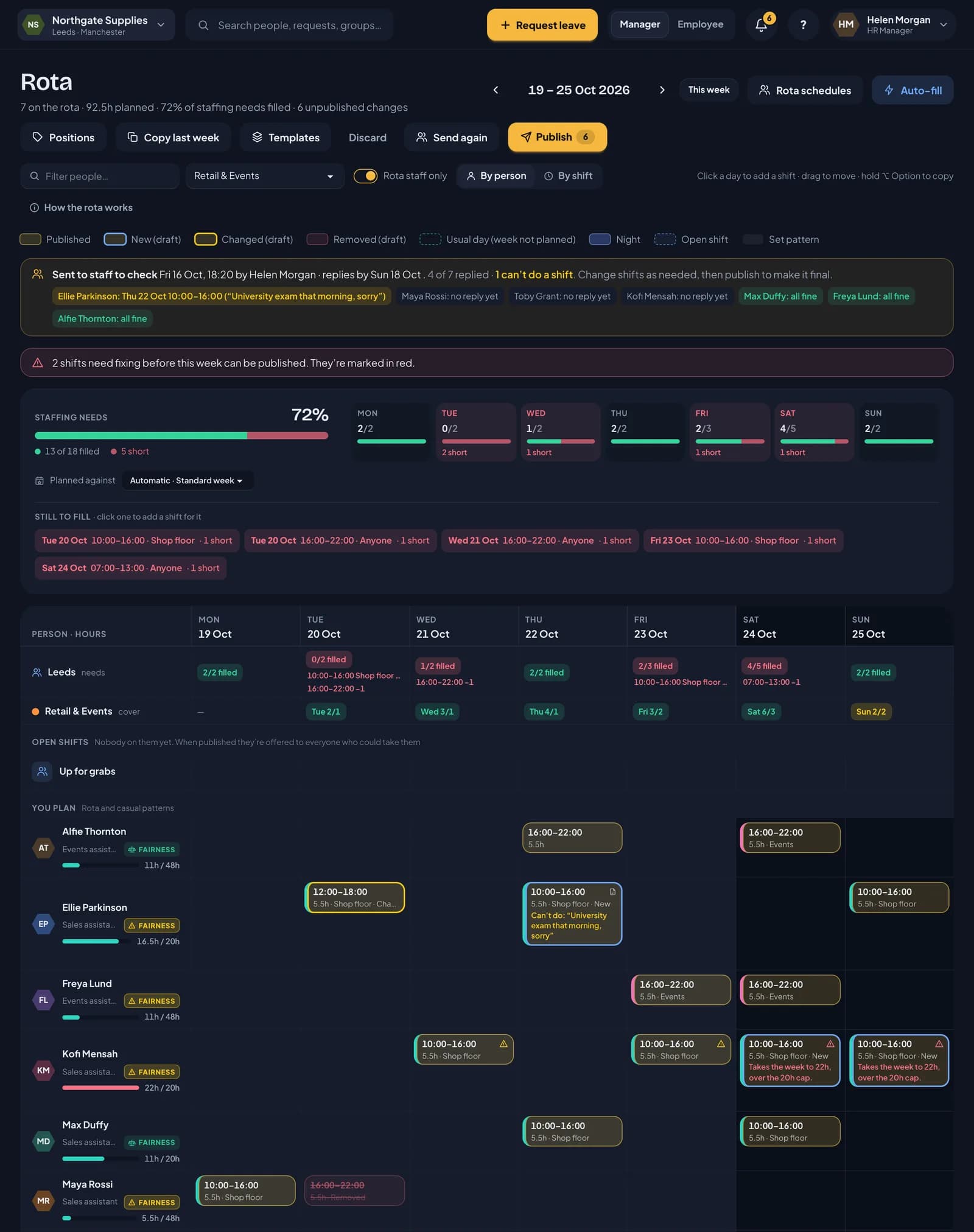
A published rota is final: people plan their week around it. So it’s better to find out that someone can’t do Thursday before you publish, not after. Send for review shows your staff the week you’re proposing and lets them tell you what doesn’t work.
Sending the week
Plan the week as usual, then click Send for review on the rota. You can add:
- a reply-by date, so people know when you’ll publish
- a short message, such as “Half-term week. Tell me by Sunday if anything doesn’t work.”
Everyone you plan who has shifts that week gets it, and so does anyone who’s had a shift taken away. Each of them gets a notification in RotaTiger and an email listing their proposed shifts.
Sending for review doesn’t publish anything. Their hours, cover and holiday accrual don’t change, and the week stays a draft until you publish it.
What your staff see
When they open RotaTiger, a card at the top of their home page asks Can you do these? It shows their proposed shifts for the week, your message, and when you’ll publish.
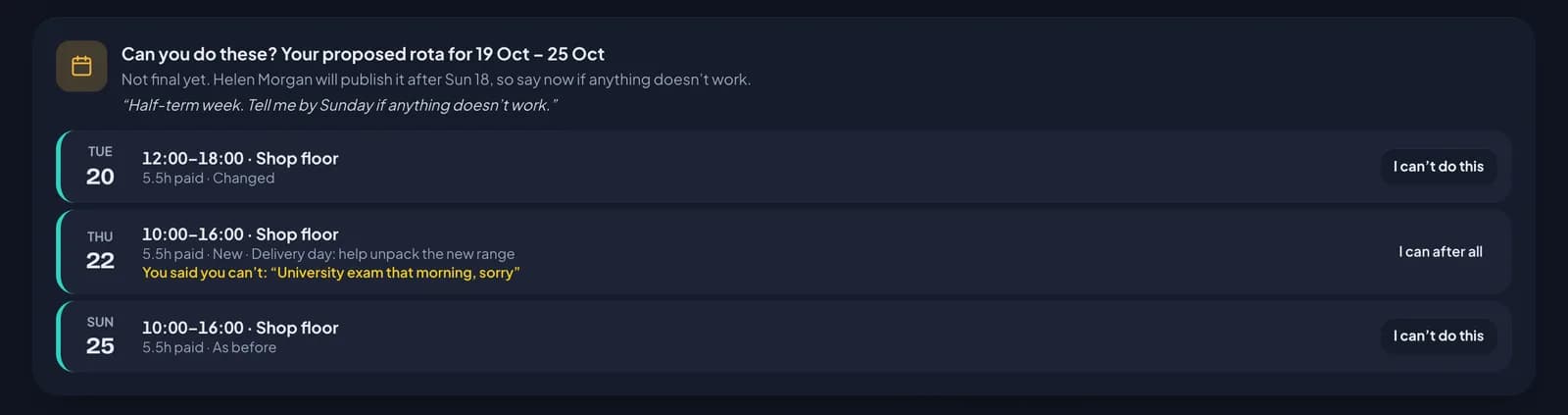
Each shift is marked so they can see what’s different:
- New: a shift they didn’t have before
- Changed: the times or position have moved
- As before: already published and unchanged
- No longer yours: a shift that’s been taken off them
If the week works, they click Looks good. If a shift doesn’t, they click I can’t do this and say why, such as an exam or a hospital appointment. RotaTiger asks for a reason so you have something to go on. They can change their mind with I can after all.
Staff reply in RotaTiger on the web, from a computer or their phone’s browser.
The iPhone and Android apps are coming soon, and won’t show proposed weeks at first, so replies are made on the web.
Seeing the replies
While a week is out for review, a banner above the rota shows when you sent it, the reply-by date, and how many people have replied. Under it, each person is listed:
- in amber, with the shift and their reason, if they can’t do a shift
- no reply yet, if they haven’t answered
- in green, all fine, if they’ve said the week works
The shift itself shows Can’t do with their reason, both on the grid and in the by shift view, so you can see it while you fix it. Whoever sent the week gets a notification in RotaTiger each time someone replies.
If you change a shift after someone has replied about it, their reply is marked changed since, so you know it may no longer apply.
Sending it again
Made changes? Click Send again. Everyone on the week sees the latest version, and the replies you already have are kept.
Publishing ends the review
When you’re happy, publish as normal. The publish preview has a From the review section with anything people said they can’t do and who hasn’t replied, so nothing slips through. Publishing makes the week final and closes the review.
You don’t have to send every week for review. It’s there for the weeks where it helps, such as school holidays, Christmas, or a week with lots of changes.
Next: drafts and publishing.