
Most questions about holiday and rotas are quick ones. Who’s off on Friday? How much leave have I got left? Can I take the week after half term? Has Chloe’s request come in yet? The answers are all in RotaTiger, but finding them still means opening the app, picking the right screen and reading it.
Now you can ask instead. RotaTiger works inside Claude and ChatGPT, as well as other AI assistants that support MCP. The answer comes back in the conversation you’re already having, worked out from your company’s actual rota and leave.
What you can ask
Ask the way you’d ask a colleague. The assistant works out which part of RotaTiger to look at.
If you’re on the rota:
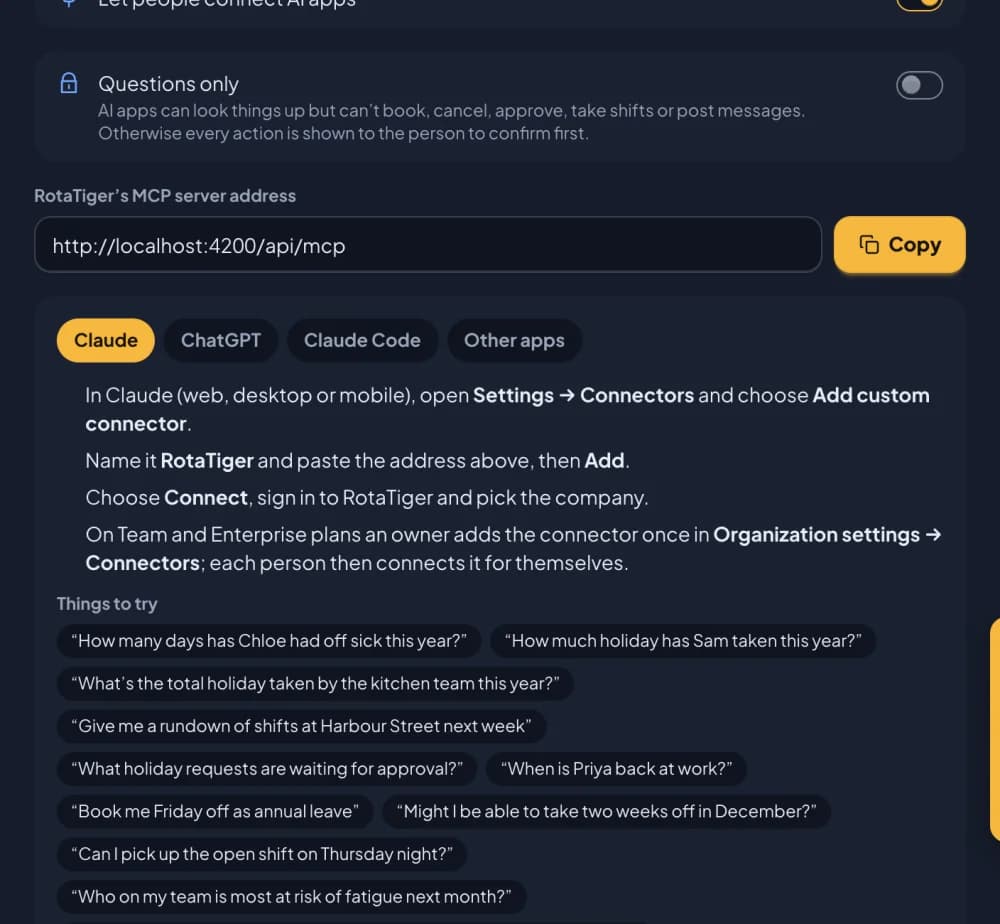
- “Might I be able to take two weeks off in December?”
- “How much holiday have I got left this year?”
- “When am I working next week?”
- “Can I pick up the open shift on Thursday night?”
- “Who’s off on Friday?”
- “Book me the 14th off as annual leave.”
If you manage a team:
- “What holiday requests are waiting for me?”
- “How many days has Chloe had off sick this year?”
- “What’s the total holiday taken by the kitchen team this year?”
- “Give me a rundown of shifts at Harbour Street next week.”
- “Who on my team is most at risk of fatigue next month?”
- “Were more people off sick the day after the big matches this summer?”
If you run HR: all of that for the whole company, plus “Post a message to everyone: the car park is closed on Monday.”
You can use first names, and teams and locations by name: “the kitchen” and “Harbour Street” both work. If a name could mean two people, the assistant asks which you meant. If you work for more than one company in RotaTiger, it looks across the companies you’ve connected.
“Might I be able to take two weeks off in December?”
This is the question we built it for, because it’s the one people find hardest to answer for themselves. A good answer depends on your balance, your working days, the bank holidays, who else in your team is already off, and your company’s own rules. RotaTiger knows all of those.
The assistant tries every possible start date in the period you give it, picks the best few, and checks each one against your company’s rules: notice periods, blackout days, how many people can be off at once, and whether your team would be short-staffed. For each one you get:
- what it would cost, in working days, and your balance afterwards
- how many of your team are already off then (a count, never names)
- any days the team would be short
- a plain verdict: would be approved straight away, likely, possible, but your approver may say no (and why), or can’t be booked (and why)
Unless your company’s rules approve that leave automatically, your approver still decides, and nothing is booked until you ask for it. What it saves is the back-and-forth: before you ask, you can see which dates clash with leave already booked or break a rule.
Shifts and fatigue
The assistant can also use RotaTiger’s rota and shift tools:
- Shifts and open shifts. Ask for your shifts, a rundown of a location’s week, or the open shifts you could pick up. If taking one would mean too many nights in a row or too little rest, the assistant tells you, with the same fatigue and rest warnings RotaTiger shows on screen. They don’t stop you taking it.
- Fatigue risk. If your company uses RotaTiger’s fatigue checks, managers can ask who’s most at risk among the people they plan for, and why: runs of nights or early starts, too few days off afterwards, switching between days and nights too fast, no weekends off, or falling below the legal rest limits.
- Patterns in sickness. Managers and HR can compare how many people were off sick on chosen dates (the day after a big match, say) with a usual day: the same weekday in the weeks before. It gives counts, never names, and only covers people whose sickness you’re allowed to see. It needs at least 5 of them, and leaves out any day when fewer than 5 were working.
- Working days, not calendar days. Holiday and sickness are counted the way RotaTiger’s Calendar counts them: for someone working Monday to Friday, a fortnight away is 10 days, and a half day is half.
It works as you, and only as you
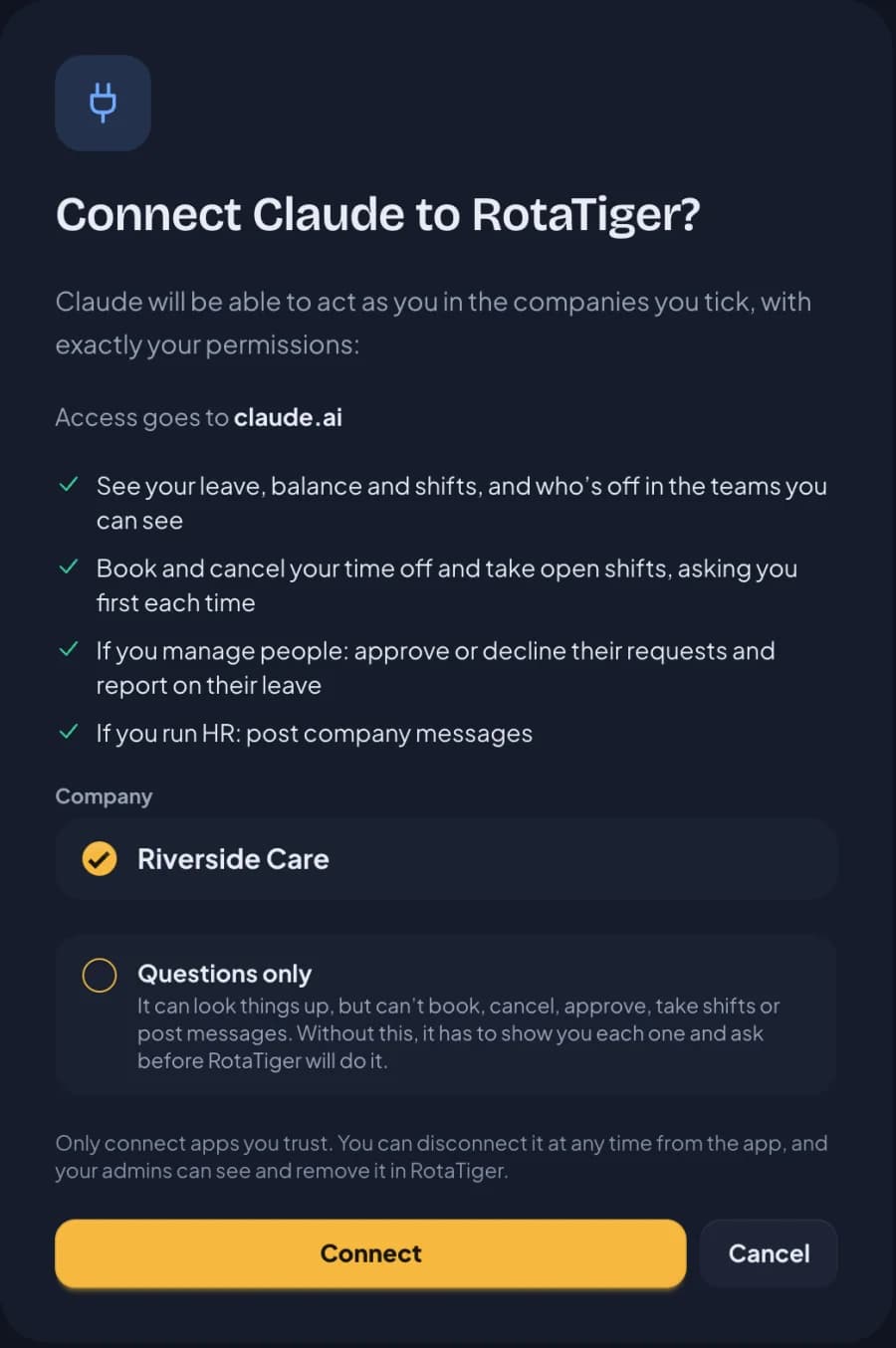
When you connect an AI assistant, you sign in to RotaTiger in your browser and choose which companies to connect. From then on, the assistant goes through exactly the same checks as RotaTiger itself:
- Staff see their own leave, balance and shifts, and when their teammates are off, the same way the wallchart shows it. Private leave types such as sickness appear only as Away, and anything the team wasn’t told about is left out. Never anyone else’s balance or requests.
- Managers see and approve their own team’s leave, and report on it.
- HR and owners see the whole company, and can post company messages.
If you can’t see someone’s sickness in RotaTiger, neither can your assistant. There’s no special access for AI, and no API key to look after.
Nothing changes without your say-so
An assistant that can book leave and approve requests has to be careful, so we made the careful path the only path. Booking, cancelling, approving or declining, taking an open shift and posting a message all take two steps:
- The assistant asks RotaTiger, which works out exactly what would happen (the dates, what it costs, any warnings) and does nothing yet.
- The assistant shows you. Only if you say yes does it come back with a one-time code for exactly those details, and RotaTiger does it.
The code works once, for ten minutes, and only for what you were shown. If anything changes in between (someone else approves the request first, or the dates are changed), it’s refused and the assistant has to ask you again. Each connection can make at most 30 changes an hour, and every change is recorded in your company’s audit log.
Want to be completely sure? Connect it for questions only. It can still look up everything you can, but it can’t change anything. Admins can make the whole company questions only with one switch.
Privacy and security
Letting an AI app into your company’s rota and leave needs care, so these protections are built in:
- Notes stay out of the AI. The notes people type on requests and shifts are never sent to the assistant, so nobody can hide instructions in a note and nothing personal in one leaks into a chat.
- Sickness stays private. Sickness and other private leave show as Away to anyone who isn’t allowed to see them, through the assistant as everywhere else in RotaTiger.
- Your sign-in rules apply. If your company asks for two-step verification, AI apps can’t be connected without it. Changing or resetting your password, or turning two-step off, disconnects them.
- No look-alikes. RotaTiger shows where access is going (claude.ai, chatgpt.com) and warns you if it doesn’t recognise the app, to help you spot a misleading link.
- You stay in control. Everyone can see and disconnect their own AI apps on their Profile. Admins see every app connected in the company and can disconnect any of them, or switch AI assistants off for everyone in one go.
How it works
AI assistants talk to other apps using the Model Context Protocol (MCP), an open standard that Claude, ChatGPT and a growing list of other apps support. RotaTiger runs an MCP server: a set of tools the assistant can use, such as “who’s off”, “plan time off” or “approve a request”, each one going through the same rules as the RotaTiger app.
When you ask a question, the assistant chooses which tools to use, RotaTiger works out the answer from your live data, and the assistant explains it. RotaTiger calculates the figures itself, so they’re the same numbers you’d see on screen.
Sign-in uses OAuth: you authorise the connection on RotaTiger’s own sign-in page, so the assistant never sees your password.
Works with the apps you already use
It works with AI apps that can add a remote MCP server with sign-in, including:
- Claude, on the web, desktop and mobile
- ChatGPT
- Claude Code, Cursor, VS Code and Gemini CLI
Our help guide has the set-up steps for each app.
What’s next
If your team already uses an AI assistant at work, RotaTiger can now answer their rota and leave questions there, with the same rules as the app. It joins RotaTiger’s API and webhooks, which connect payroll and HR systems under the same permissions. We’ll keep adding tools to the assistant, and we’d like to hear what you ask it: questions it can’t answer yet tell us what to build next.
Get started
- Admins: open Settings → Integrations and switch on Let people connect AI apps. Choose Questions only too if you’d like to start there.
- Everyone: add
https://app.rotatiger.com/api/mcpto your AI app, sign in to RotaTiger, and tick your company. - Ask your first question.
AI assistants come with every RotaTiger account at no extra cost. You’ll need your own plan with the AI app.