
Turn on optional fatigue checks and RotaTiger reviews every shift you plan for long runs of shifts, short recovery and missed weekends. Each warning shows the pattern behind it, so you can decide what to change before the rota goes out.
They support scheduling decisions. They don’t diagnose burnout or anyone’s health, and they don’t replace a fatigue risk assessment or your duties as an employer.
Fatigue checks are included in the one price per person. There’s nothing extra to pay.
What gets checked
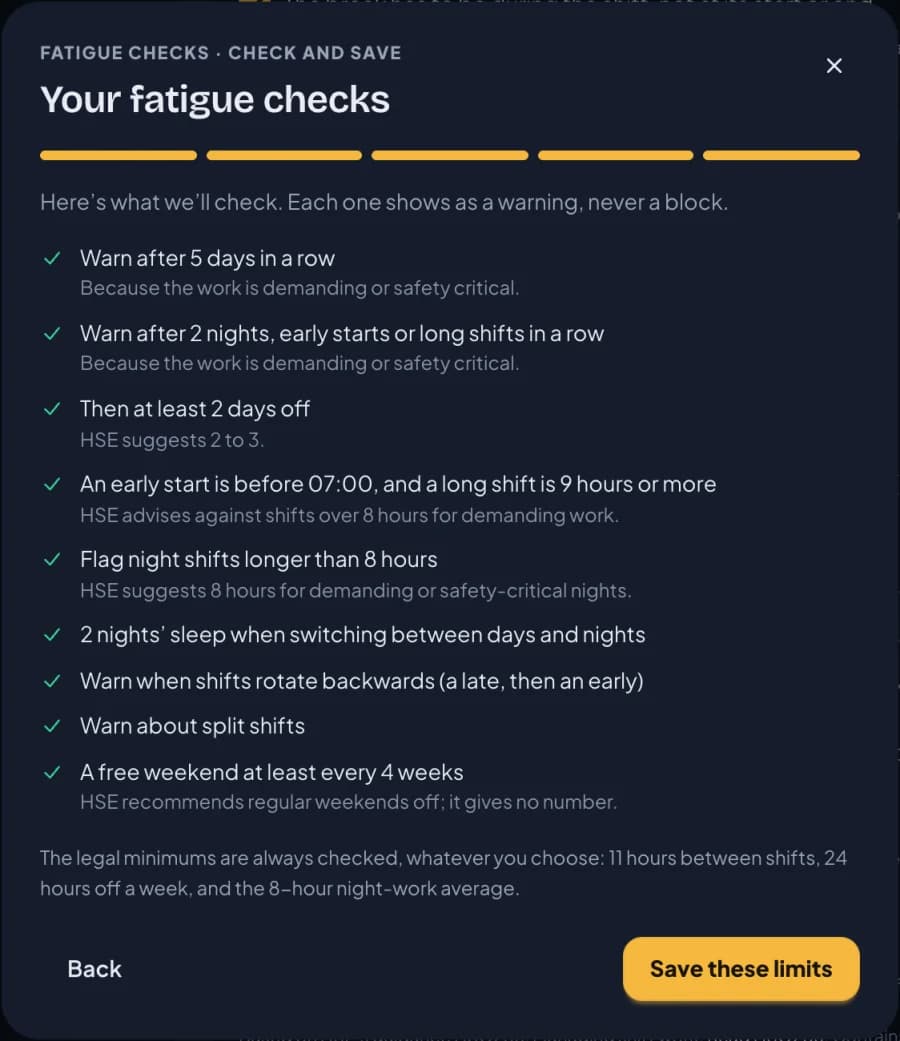
The limits start from the UK Health and Safety Executive’s (HSE) shift-work guidance, HSG256. Every limit can be changed in Settings. These are the defaults:
| Pattern | Default warning |
|---|---|
| Days in a row | After 6 working days in a row |
| Nights, early starts or long shifts in a row | After 3 in a row, then at least 2 days off |
| Switching between days and nights | Without two nights’ full sleep |
| Backward rotation | A late followed by an early |
| Long shifts | Over 12 hours, or nights over 8 hours |
| Early starts | Before 07:00, shown as a shift-design issue to fix in your staffing needs |
| Free weekends | No weekend off in 4 weeks |
| Split shifts | Checked, unless you say you use them on purpose |
RotaTiger isn’t affiliated with or endorsed by HSE.
How fatigue checks differ from the other rota checks
RotaTiger has three kinds of check, and they behave differently:
- Rota rules (red): overlaps, the longest shift, the weekly cap, approved leave and sickness. A red shift has to be fixed before the week can be published. See the checks on every shift.
- Rest warnings (amber): not enough rest between working days, breaks, availability and the like. You can publish with them.
- Fatigue warnings (⚠ and a FATIGUE badge): the patterns above. They’re advice and never block publishing. The badge is red when a UK legal limit is involved.
For UK companies, RotaTiger always checks the general Working Time Regulations rest limits, whether fatigue checks are on or not.
Where warnings appear
A ⚠ shows on any shift that breaks a limit, and a FATIGUE badge appears beside the person. Hover or tap for the reason in plain words, for example: “Makes 4 nights in a row (Mon 16 Nov to Thu 19 Nov); UK guidance (HSE) suggests 2–3, the company’s limit is 3.”
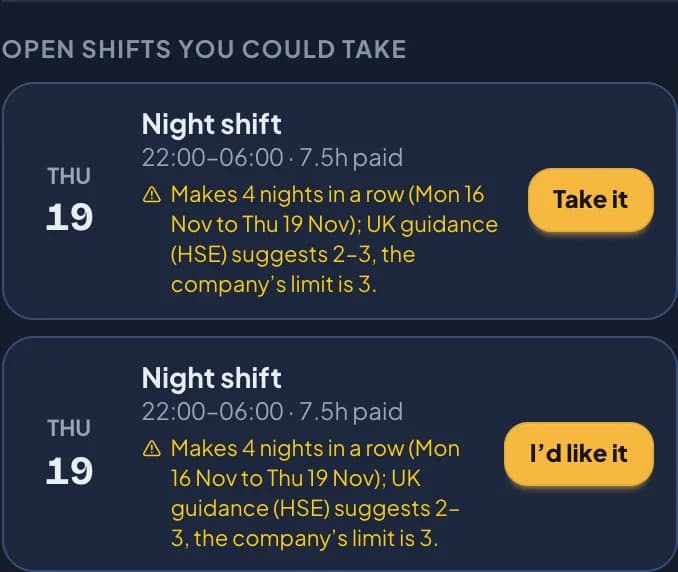
Staff see fatigue and rest warnings before they take an open shift or agree a swap. They can still go ahead, and their manager sees the same warning when choosing who gets the shift or approving the swap.
What Auto-fill does
With fatigue checks on, Auto-fill won’t create a shift that would cause a fatigue warning. When more than one person could take a shift, it prefers whoever is furthest from a limit. You still review the draft before publishing.
The Fatigue screen
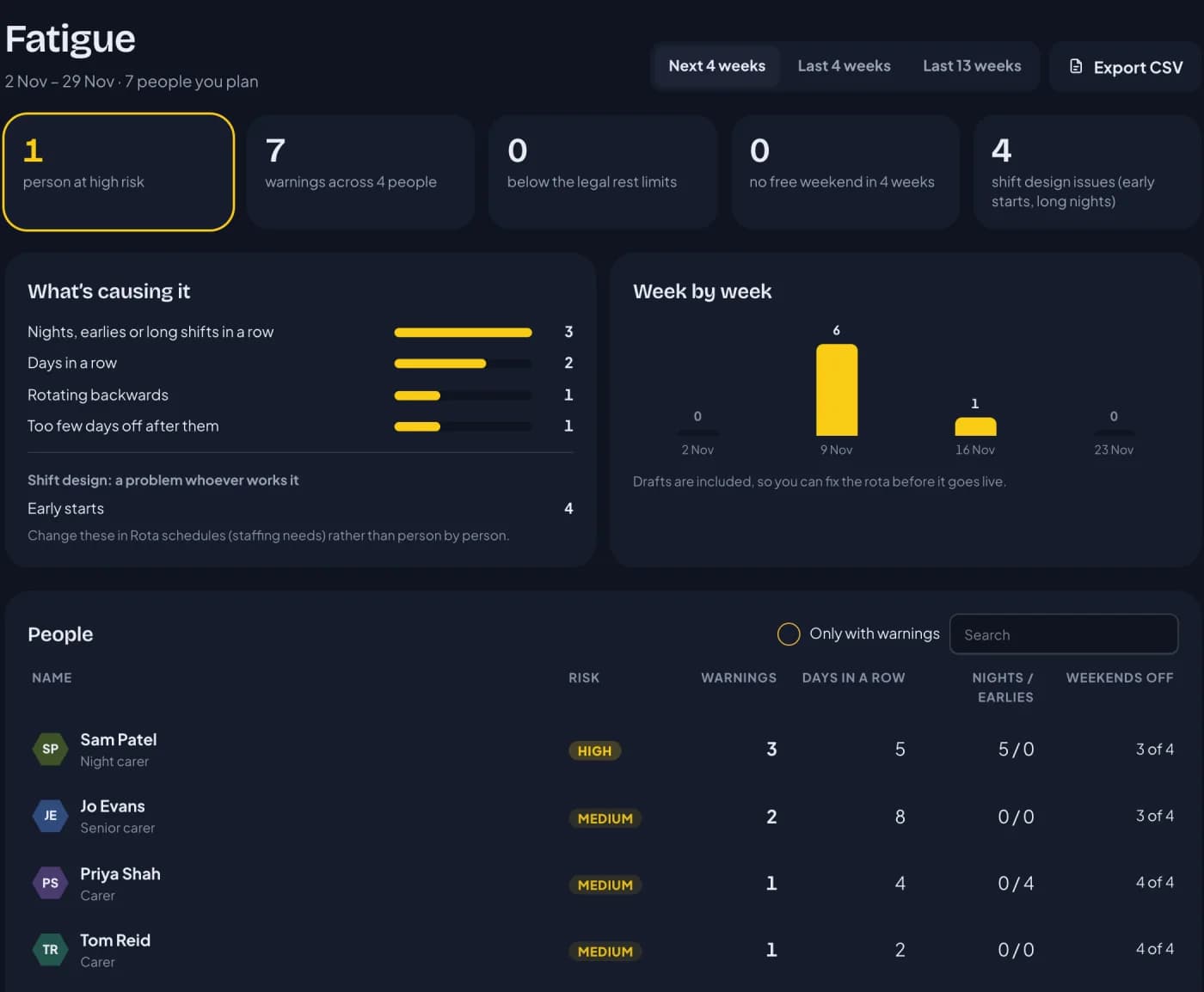
The Fatigue screen, in the Planning menu, looks at the next 4 weeks, the last 4 or the last 13:
- People: whose planned shifts trigger the most warnings, rated high, medium or low, with their longest run, nights, early starts and weekends off.
- Causes: which checks fire most, so you can see whether it’s one person’s pattern or the whole rota.
- Week by week: where the pressure falls, drafts included.
- Shift design: problems that belong to a shift rather than a person, such as a 06:00 start.
Ratings describe planned shift patterns, not anyone’s health. Managers and HR see them for the people they plan; staff never see ratings, including their own. Everything exports to CSV, to keep a record of what you reviewed.
UK and US
The checks use HSE’s guidance as a yardstick for companies in both countries, and every warning says where its limit comes from. For UK companies, RotaTiger also checks the general Working Time Regulations rest limits. In the US, RotaTiger doesn’t check federal, state or local hours rules: the fatigue limits are guidance, not a statement of what the law requires where you are.
How to start
- Open Settings and find Fatigue checks.
- Choose Set up with 3 questions: is the work demanding or safety-critical, do some people only work weekends, and do you use split shifts on purpose? RotaTiger suggests limits to match, with HSE’s range beside each. Or set the limits yourself.
- Plan as usual. Warnings appear as you go.
For the background (what HSE, OSHA and NIOSH say about shift work and fatigue), read Shift-work fatigue: a guide to RotaTiger’s checks.
Next: breaks and opening hours.