
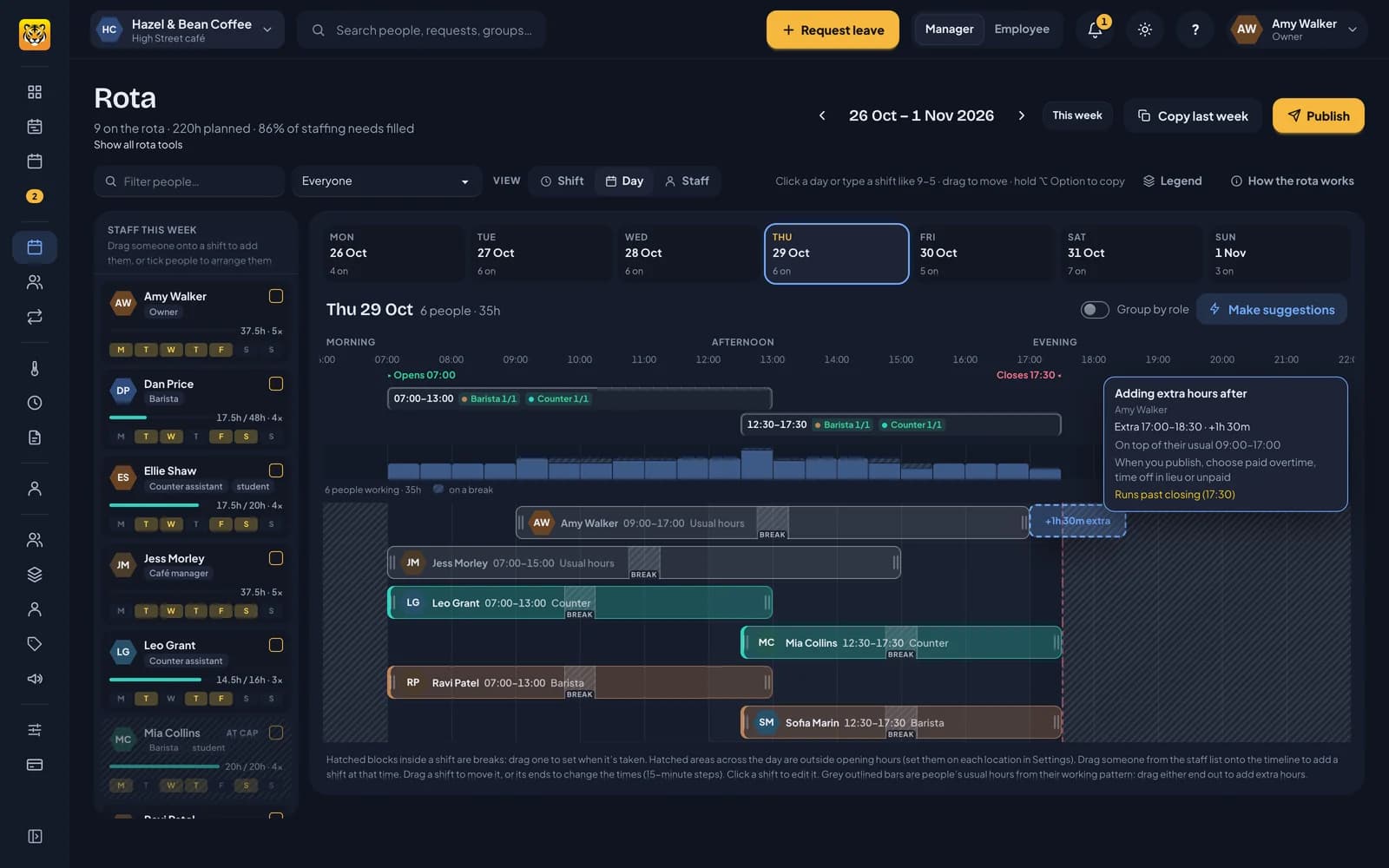
You can add extra shifts for staff on fixed hours, either by adding a separate shift or extending their usual day. Their usual hours come from their working pattern and appear in grey on the rota so you can see who’s covering each day.
For example, a café manager who usually works 07:00 to 15:00, Tuesday to Saturday, might stay late for a delivery or come in on a Sunday. That extra time is an extra shift, on top of their usual hours.
Adding extra hours
There are two ways:
- Add an extra shift. In the Staff view, click a day for someone on fixed hours and add a shift, just as you would for anyone else. It’s marked as extra, on top of their usual hours.
- Stretch their usual day. On the day view, hover over their grey usual hours and drag either end out. A dashed block shows the extra time, such as +1h 30m extra, and a card shows the times and anything to check, such as running past closing. Let go to save it as an extra shift joined on to their usual hours. Drag again to make it longer.
You can extend usual hours, but you can’t shorten them this way. To record time off, use a leave request so it’s counted against their allowance properly.
Extra shifts go through the same checks as other shifts, including rest between days, weekly caps, leave, sickness and availability.
Paid, time off in lieu or unpaid
When you publish a week with extra hours, RotaTiger asks about each person: Amy Walker is 1h 30m over with extra shifts on top of their usual hours. Is the extra overtime?
- Yes, paid overtime. Recorded as approved overtime for payroll.
- Yes, as time off in lieu. Added to their time off in lieu balance, at the rate their policy sets.
- No, unpaid. The shift stays on the rota, but no overtime is recorded.
Their allowance policy determines whether you can choose paid overtime, time off in lieu, or either option. If their policy doesn’t record overtime, only unpaid is offered.
If your rota’s changes go live as you save, extra hours are recorded according to their policy, without a publish step.
The same question appears for rota staff planned over their contracted hours. See leave, holiday and hours.
Next: what your staff see.