

The café rota, without the spreadsheet.
Type 10-2 into Saturday to add a shift, or copy last week’s rota. Check holiday, students’ weekly caps and who can’t work as you plan. Your team gets their shifts on their phone, or by email if they haven’t joined yet.
Free for your first 6 months, then £1$1 per person per month. No credit card required today.Everything a café rota needs, and nothing it doesn’t.
People and days
Simple mode shows who’s working when and their hours for the week. Switch on the other tools when you need them.
Type shifts straight in
Type 10-2, 7a-3p or 8-4 30m for a shift with a break. Press Enter to move to the next day.
Students’ weekly caps
Set a weekly cap in each student’s working pattern, such as 20 hours. The rota warns before anyone goes over, and greys them out when their hours are used up.
Holiday for casual staff
In the UK, casual staff build up 12.07% holiday on the hours they actually work. RotaTiger calculates it for you.
Breaks and opening hours
Breaks follow your country’s rules. The Day view shows opening and closing times and how many people are on a break.
Shifts by email or phone
People who haven’t joined RotaTiger yet still get their shifts by email. Once they join, they see them in their phone’s browser.
Get the lunch rush right.
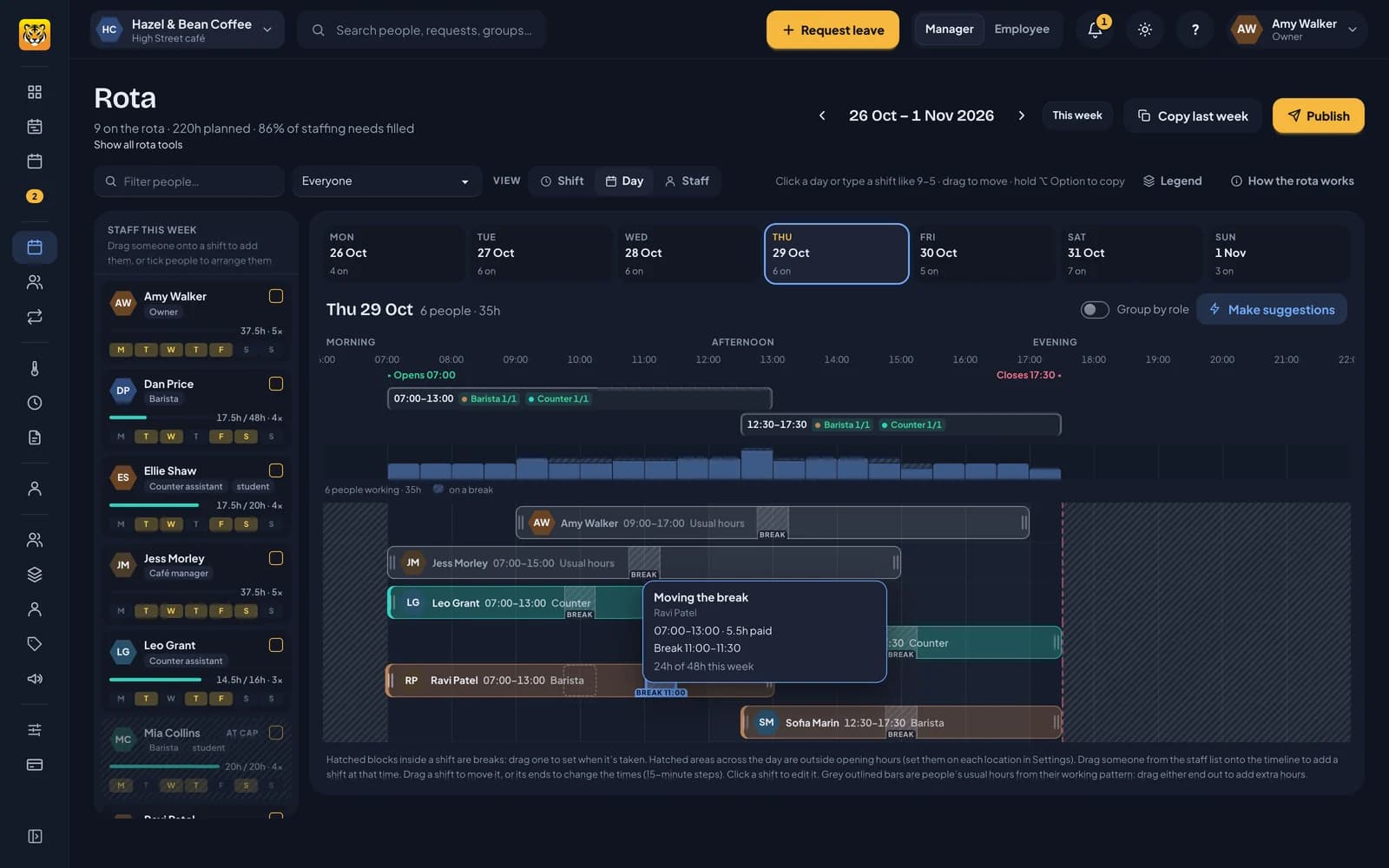
Pick a day to see its shifts on a timeline. Drag someone from the staff list onto it, move shifts, and drag each break to when it’s taken.
- Opening hours and the shifts you need that day appear above the timeline.
- A bar for every half hour shows how many people are on and how many of them are on a break.
- As you drag, a card shows the new times, paid hours and anything to check, such as running past closing.
Fill a gap with the right person.
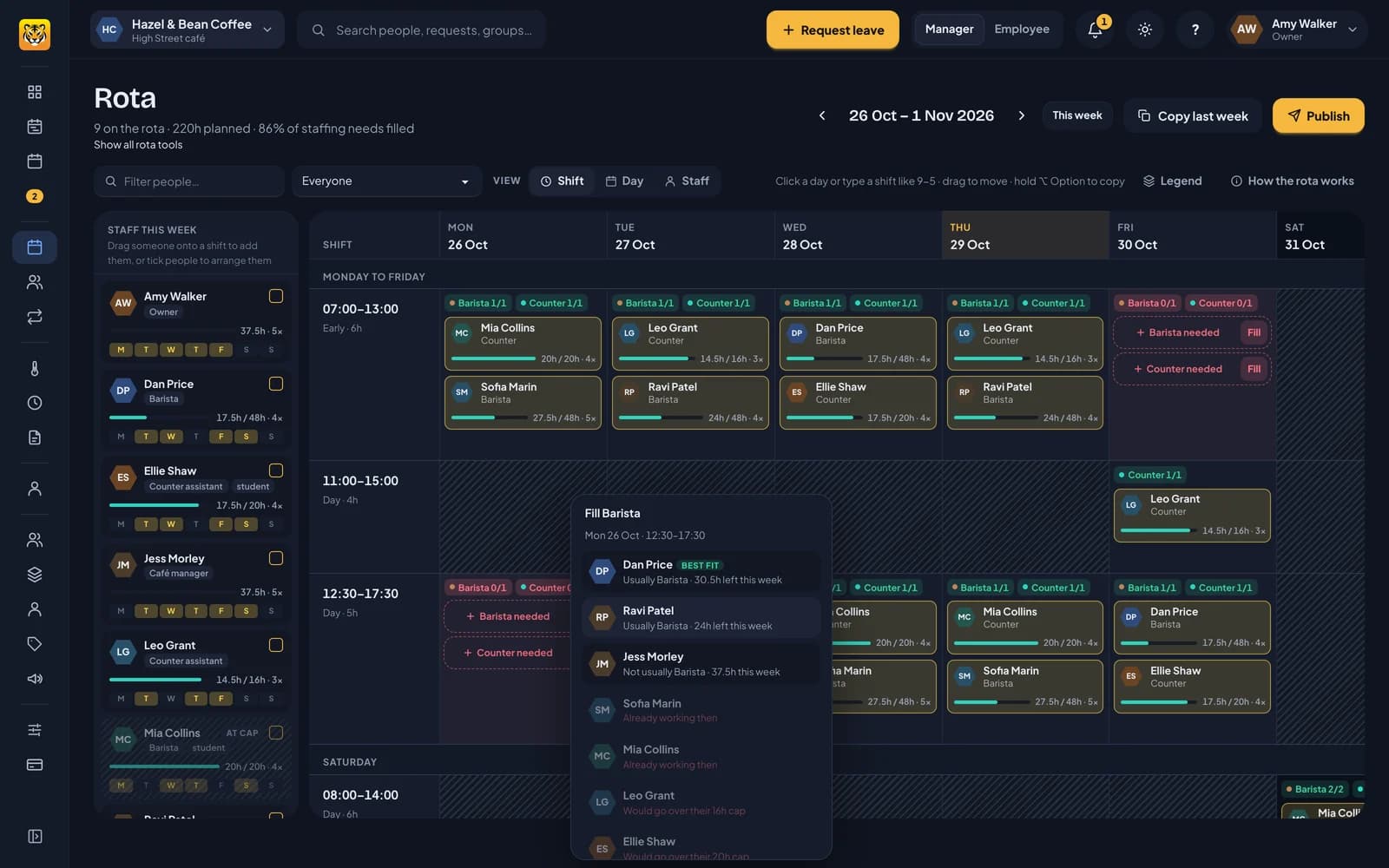
Click Fill on any gap and RotaTiger lists who could take it, best fit first. Each person has a short reason, such as usually working that role or having hours left.
- People on leave, already working or at their cap are faded, with the reason.
- Click a name to add the shift with the right times, role and break.
- Or post it as an open shift for anyone who could work it to take.
Try it on our café first.
Hazel & Bean Coffee has nine staff and a week already planned, so you can try the rota before adding your own team.
Try the sample rota
Open Hazel & Bean Coffee, type in a shift and try the tools you need.
Open the sample café →Bring your Timetastic data
Upload each person’s download from Timetastic to bring across their allowances, carried-over days, time in lieu and bookings. You see a preview before anything is saved.
Your price locked for 2 years
£1$1 per person per month, plus VAT, fixed for 2 years from your first payment.
Leave whenever you like
No contract. Cancel your plan in Billing at any time, and export your people, leave, sickness, balances and overtime as CSV in one zip.
The price lock covers the price per person for 2 years from your first payment. VAT follows the law. You still only pay for active people.
Short guides for a café rota.
- The rota for small teams →Simple mode, typing shifts in, copying last week and publishing as you go.
- Breaks and opening hours →Break rules by country, when breaks are taken, and opening hours on the day.
- What your staff see →Their shifts, open shifts to take, and holiday, on their phone or by email.
- Staff availability →Staff say when they can’t work and when they’d prefer to, before you plan.
- Fatigue checks →Spot runs of early opens and weeks without a weekend off.
Café rota questions
No. Choose Simple mode to see people and days. Type a shift like 10-2 into a day, copy last week, and publish, or let changes go live as you save. You can switch on staffing levels, Auto-fill and the other tools when you need them.
Yes. Give them a working pattern with a weekly cap, such as 20 hours. Every shift is checked against it as you place it, and the staff list greys them out once their hours are used up.
No. They sign in from their phone’s browser with the link in their invite email. Until they join, they still get their shifts by email.
Staff set it themselves in RotaTiger: when they can’t work and when they’d prefer to, every week or on particular dates. The rota warns you about a clash as you plan, and Auto-fill and Arrange never book anyone when they’ve said they can’t work.
If you turn on fatigue checks, yes. Starts before 07:00 count as early starts, and a long run of them is flagged with the reason. Because an early start belongs to the shift, not the person, RotaTiger also shows it as a shift-design question for your staffing needs. Warnings never stop you publishing.
Yes. The Day view shows how many people are working every half hour and how many of them are on a break, so you can stagger lunches and plan cover for the counter.
Nothing for your first 6 months, with every feature switched on. After that it’s £1$1 per person per month, plus VAT, for active people only, fixed for 2 years from your first payment.
Plan next week’s café rota.
Free for your first 6 months. No credit card required today.