Your rota and holiday, on your Android phone.
Today’s shift and holiday left on the home screen, and the rota for the weeks ahead. Book time off in three taps, tell your manager you’re not well before your shift, and take an open shift. Line managers approve from the same app.
Free to download, and it comes with every RotaTiger account. For phones running Android 9 or later.The screens people use most.
Three screens from the Android app, with a sample company’s data.
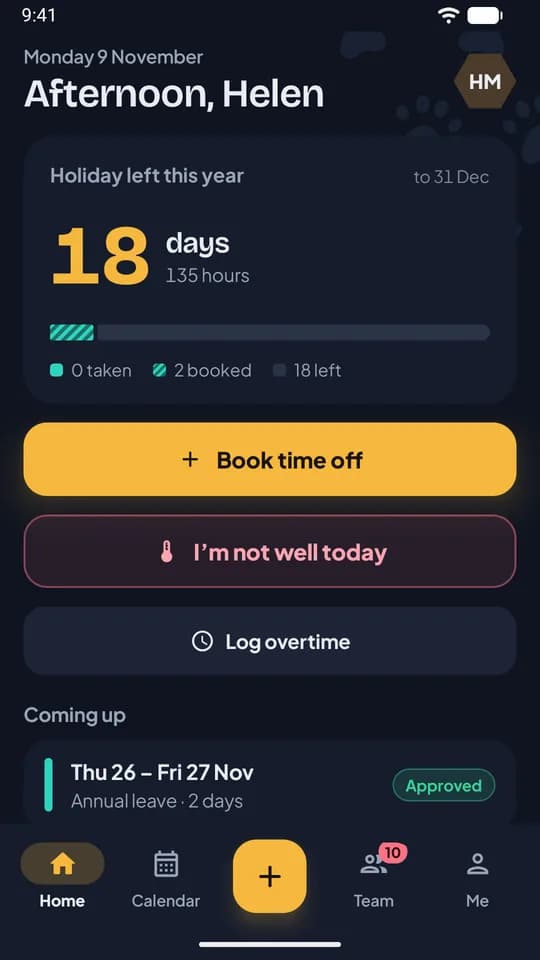
Home
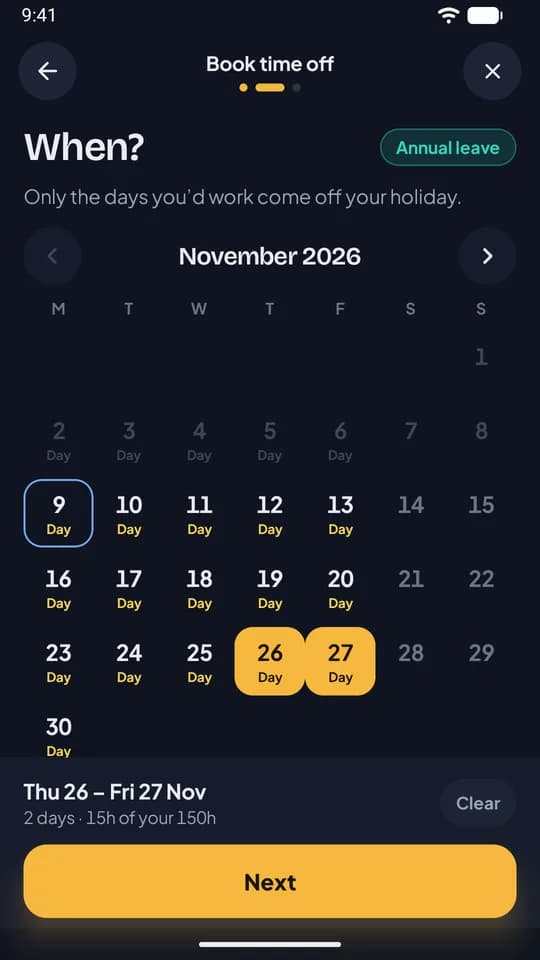
Book time off
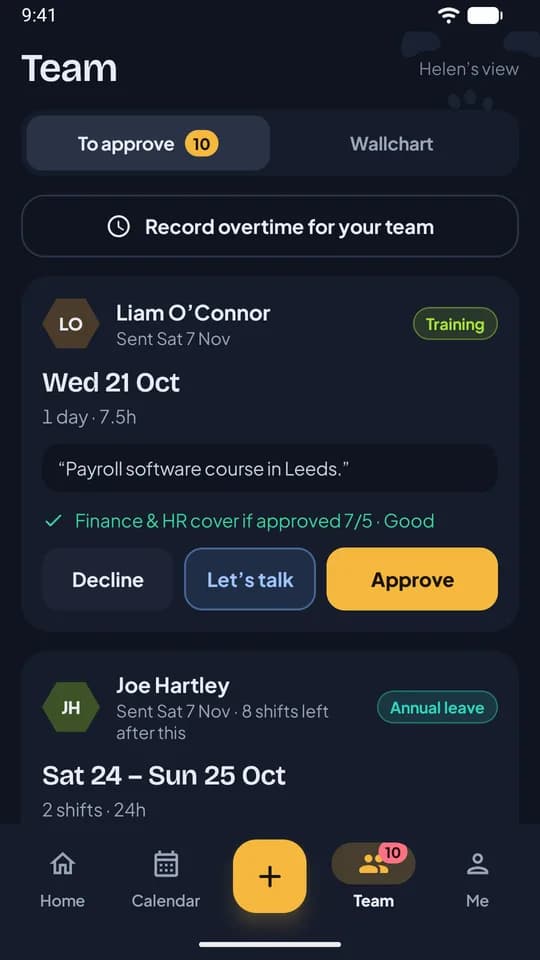
Team, for managers
The things people actually do on a shift.
Big buttons and plain words, a tap or two from the home screen.
Their rota
The next four weeks of shifts, with your notes, and a notification the moment the rota is published or changes.
Book time off
Three taps. Only the shifts they’d have worked come off their balance, and on a folding phone the calendar and request sit side by side.
I’m not well today
Tell their manager they’re off sick from the home screen. The reason goes to their manager and HR only.
Open shifts
Extra shifts go out as a notification, and they can take one straight from it.
Widgets
Home screen widgets for the next shift and holiday left.
No passwords
Sign in with a code sent to their email or mobile, then a fingerprint or face unlock. Passkeys and two-step verification work too.
Swap a shift
Ask a colleague to swap. Their manager approves it, with cover checked first.
When they can’t work
Set the days and times they can’t work, and when they’d prefer to, every week or on particular dates.
In their calendar
Add shifts and time off to the phone’s own calendar, and keep them up to date.
Approve it from wherever you are.
Line managers use the same app. Requests arrive as a notification with Approve and Decline on it.
- Approve, decline or choose “Let’s talk” on each request.
- Each request warns you if saying yes would leave the team below minimum cover.
- The team wallchart and overtime are in the app too.
- Planning and publishing the rota is done on app.rotatiger.com, where there’s room for the whole week.
No ads. No tracking.
It’s an app for work, so it behaves like one. Our privacy notice has the detail.
- No advertising, analytics or tracking, and nothing sold to anyone.
- It only asks for a permission, such as notifications or the calendar, when someone uses the feature that needs it.
- Fingerprints stay on the phone. The app is only told whether the check passed.
- Sign-in details are kept in Android’s Keystore, on that phone only.
- Sickness reasons are encrypted, and colleagues only ever see “Away”.
Questions
From Google Play. Search for RotaTiger, or use the button on this page.
No. The app is for companies that already use RotaTiger. Your employer creates your account and sends an invite. Then enter your work email or mobile number in the app, type the code we send, and use a fingerprint or face unlock from then on. If you run a business, register on the website to start.
No. It’s free to download, and it comes with every RotaTiger account at no extra cost.
Phones running Android 9 or later, including folding phones, where the calendar and the request sit side by side.
Yes, on the App Store, for iPhone and iPad. See the apps page for both.
No. Everything staff can do in the app also works in any phone’s browser, so nobody has to install anything.
Put the rota in their pocket.
Free for your first 6 months, then £1 (UK) or $1 (US) per person per month, with the Android app included. No credit card required today.